Payments
How to Set Up Alipay With a Foreign Card Before You Fly to China
Last updated:

Set Alipay up at home, on stable Wi-Fi, before you fly. Register with your usual international phone number, link a foreign card (typically Visa or Mastercard), complete passport verification when the app asks, and make a tiny test payment once you land. You do not need a Chinese (+86) number.
Facts on this page were checked against official or government sources on 14 November 2026. App screens and card rules change, so treat the confirmation screen in the app as the final word on a given payment.
Why set this up before you leave
Alipay is one of the two payment apps most visitors use for everyday spending in mainland China (the other is WeChat Pay). Linking a foreign card and verifying a passport is much easier at home, when your number receives SMS codes reliably and you can still call your bank.
Common first-day problems are easier to prevent than to fix at a taxi rank:
- Your bank’s fraud system. The first Alipay charge from China often looks unusual to an issuer. The National Immigration Administration payment guidance republished by Beijing Exit-Entry (12 November 2024) notes that some issuing banks reject binding requests and recommends contacting the bank’s customer service if that happens.
- Identity verification. Passport uploads and name checks are simpler on home Wi-Fi than on a tired airport connection.
- SMS codes. Keep the number you registered with able to receive texts. If you swap SIMs and lose that inbox, you may not be able to log in or confirm a payment. See what apps to download before going to China and the pre-departure checklist for the wider setup order.
How to set up Alipay, step by step
A payment guide from the Chinese Embassy in the United States describes the flow as follows (menu names can shift slightly by app version):
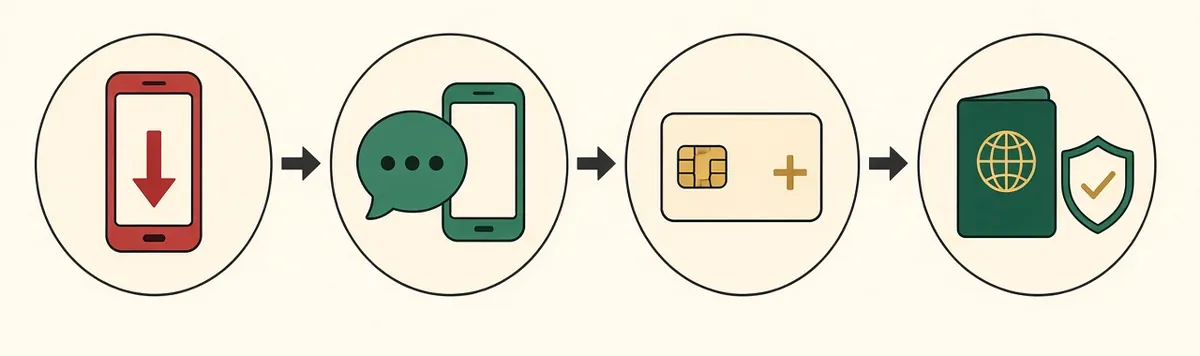
- Download Alipay from the Apple App Store, Google Play, or Alipay’s official website. Do not install it from an unofficial APK site.
- Register with your phone number. Choose your country or region code and enter the number that can receive SMS. You can also sign in if you already have an account.
- Add a bank card. The embassy guide says to tap Add Now, or go to Me → Bank Cards → Add Bank Card, and follow the prompts.
- Complete identity verification when prompted, using your passport.
A Shanghai government payments guide adds a practical condition: the name on your card should match the name on your Alipay account, or linking and payments may fail. Use the name as it appears on the card and on your passport, consistently.
Once you land, make a small test payment — a bottle of water at a convenience store is enough — so any bank block shows up before you need the app for a hotel or a ride.
Which cards can you add?
The embassy payment guide lists UnionPay, Visa, Mastercard, JCB, Diners Club, and Discover as cards that can be added to Alipay.
American Express is listed in the same guide among cards that can be added to WeChat Pay, but it is not in the guide’s Alipay list. Card acceptance changes. If Amex is your main card, check what Alipay’s “Add card” screen accepts on the day you set it up, and bring a Visa or Mastercard as well.
The Beijing Exit-Entry guidance lists Mastercard, Visa, JCB, Diners Club, Discover, and UnionPay as cards foreigners can bind in Alipay or WeChat. That page also does not name American Express.
Fees on a foreign card
The 200-yuan rule, as stated on WeChat’s official help page for international cards (opened 14 November 2026):
| Single payment with an international card | Service fee |
|---|---|
| 200 yuan or less | No service fee |
| Above 200 yuan | 3% of the transaction |
| If the payment is refunded | The fee is reimbursed in proportion to the refunded amount |
The NIA / Beijing Exit-Entry guide describes the same 200-yuan waiver and 3% fee for both Alipay and WeChat. The Shanghai government page also states this fee rule, and notes that a refund reimburses the fee in proportion.
We did not find a currently loading official Alipay help article that states the fee in Alipay’s own words. Treat the payment confirmation screen as authoritative for that charge. Your card issuer may add its own foreign-transaction or currency-conversion fee on top. Exchange rates are set by the card network and issuing bank, not by the app.
A worked example using the published 3% rule: a 180-yuan meal is charged as 180 yuan; a 250-yuan meal is 250 yuan plus a 7.50-yuan service fee. Always read the screen before you confirm.
For hotels and other large bills, ask whether you can pay directly with a physical card at the desk. Many international hotels accept Visa and Mastercard, which avoids the app’s 3% fee (your bank’s own fee may still apply).
A later calculator for this fee is planned at Alipay fees for foreigners.
Limits: use current official figures, not old municipal pages
Published caps are not all the same, and they have changed:
- A State Council English “Payment service guide for overseas visitors” dated 11 April 2024 says the single-transaction limit for overseas visitors using mobile payments was raised from US$1,000 to US$5,000, and the annual cap from US$10,000 to US$50,000.
- A People’s Bank of China Qingdao payment guide, opened 14 November 2026, still states those same US$5,000 / US$50,000 mobile-payment limits.
- WeChat’s official help page currently lists 6,500 yuan per transaction, 50,000 yuan per month, and 65,000 yuan per year for international cards on Weixin Pay.
Alipay’s exact current per-transaction and annual limits for a given foreign-card account are not independently confirmed from an official Alipay page we could open. The app shows the limits that apply to your account. Trust that screen.
Do not use older Shanghai or municipal pages that still quote a US$1,000 single-transaction limit and a US$10,000 annual cap. Those were the pre-2024 figures; the April 2024 government announcement raised them. The Shanghai payments page linked above still displays the old dollar caps alongside the (still current) fee rule — another reason to prefer the app and the 2024–2025 official announcements.
For a typical holiday you are unlikely to hit these caps. If you do, pay the merchant with a physical card or cash.
How to pay in the shop
There are two methods, described in the embassy guide and on the Shanghai government page:
- Show your code. Open Pay/Receive (付款码) and let the cashier scan it. Common in supermarkets, convenience stores, and chain restaurants.
- Scan their code. Open Scan (扫一扫), scan the merchant’s QR code, enter the amount if asked, and confirm. Common at smaller shops, stalls, and local restaurants. Show the success screen afterwards.
If a payment fails, check you are online, try the other method (they scan you, or you scan them), switch to WeChat Pay, switch cards, look for a fraud text from your bank, or pay with cash or a physical card. Show the failure screen to the cashier.
Also set up WeChat Pay, and keep a backup
Alipay is not the only app you should prepare. Set up WeChat Pay as well, ideally with a different card, and carry:
- one or two international cards for hotels and larger merchants (accepted where the network logo is displayed, according to People’s Bank of China Shanghai guidance; UnionPay cards are described as accepted at all mainland merchant POS terminals);
- a modest amount of cash in yuan, from an ATM that shows your card network’s logo, a bank branch with an exchange sign (bring your passport), or an authorised exchange counter, which are common at airports.
Cash is still legal tender and useful when a scan fails, but many reservations, QR-code menus, and shared bikes expect mobile payment.
English service hotlines, from the embassy payment guide and the PBoC Qingdao guide (checked 14 November 2026):
| Service | From abroad | From a Chinese number |
|---|---|---|
| Alipay | +86 571 2688 6000 | 0571 2688 6000 |
| Weixin Pay | +86 571 95017 (embassy); PBoC Qingdao lists +86-95017 | 95017 |
| UnionPay | Embassy guide: +86 21 95516 or +86 21 2055 6900 for non-mainland numbers. PBoC Qingdao lists +86-95516. | 95516 |
Before you fly, also install the other first-trip apps and a data option that actually covers the mainland — a Hong Kong-only eSIM usually will not. Start with the apps to download list, then best eSIM for China for a plan comparison, and whether Google works with an eSIM if the question is routing rather than which brand to buy.
The same tasks sit in order on what to do before going to China. For a single, printable walkthrough of payments, internet, and your first 24 hours, the First-Time China Guide ($22) gathers the official-source steps in one place. It does not replace the app screens or your bank.
FAQ
Can I set up Alipay before I go to China? Yes. Do it at home on Wi-Fi, then test with a small payment after you land.
Do I need a Chinese (+86) phone number? No. Use an international number that can receive SMS, and keep it active for codes.
Which foreign cards can I add? The embassy guide lists UnionPay, Visa, Mastercard, JCB, Diners Club, and Discover for Alipay. American Express is listed there for WeChat Pay, not Alipay. Check the in-app screen and bring a Visa or Mastercard if Amex is your only card.
Does Alipay charge a fee on a foreign card? Official WeChat and government guidance describe no service fee at 200 yuan or less, and 3% above 200 yuan, for international cards. Confirm on Alipay’s payment screen. Your bank may add its own fee.
What is the payment limit? Government announcements in 2024 raised overseas-visitor mobile-payment caps to US$5,000 per transaction and US$50,000 per year. WeChat publishes its own yuan limits. Check Alipay in the app. Ignore older US$1,000 / US$10,000 pages.
Should I also set up WeChat Pay? Yes. Use both, plus a physical card and some cash.
Why might my card fail to link or pay? Issuing banks sometimes block or reject the first China payment or the binding request. Contact the bank, and test early.
Sources
- Chinese Embassy in the United States, payment guide for visitors (PDF) (URL path 202607; PDF metadata shows August 2025 creation and modification dates)
- WeChat Help Center, Guide to Add and Use International Cards with Weixin Pay
- NIA via Beijing Exit-Entry, mobile payment section (12 November 2024)
- gov.cn, “Payment service guide for overseas visitors to China” (11 April 2024)
- People’s Bank of China, Shanghai payment overview
- People’s Bank of China, Qingdao payment guide (includes US$5,000 / US$50,000 limits and English hotlines)
- Shanghai government, “How to seamlessly pay like a local in China” (name-match tip; this page still shows outdated US$1,000 / US$10,000 limits)
Checked 14 November 2026.
This page is general travel information, not legal, banking, or official payments advice. It is not affiliated with Alipay, WeChat, UnionPay, the People’s Bank of China, or any embassy. Card networks, fees, and app screens change. Confirm with the current official sources and the confirmation screen in the app before you pay.
Affiliate disclosure: some links on this site may be affiliate links (for example eSIMs or hotel bookings). We may earn a commission if you buy through them, at no extra cost to you. See the full disclosure.